.png)
Petmap 🐕 is a web app that builds community through thoughtful interaction and mutual love for dogs.
Sept 2024 - Dec 2024
TEAM
2 Founders, 3 Designers, 1 PM, 6 Developers
TOOLS
Figma, FigJam
ROLE
Product Design Lead, UI/UX Interface Design, Information Architecture
OVERVIEW
PetMap
PetMap is a web app designed to connect students with local pet owners, allowing them to meet, interact with, and pet dogs around campus. The app offers a real-time map of nearby dogs and features profiles for each pet, along with a chat system for coordinating meetups.
ROLE
Product Design Lead
I lead a team of 2 other designers to iterate on the pre-existing wireframes and design stories to build the design system and functional MVP to be shipped off for developer handoff. I collaborated with the development team and the founders, who provided feedback during weekly standup meetings and provided final approval on the visual design.
PROBLEM SPACE
Mental Health, Student Life, and Therapy Dogs
Many students experience stress, anxiety, and loneliness, especially during exams, but often cannot own pets due to time and housing restrictions. While therapy dogs on campus provide comfort, they are not always available. Inspired by these programs, PetMap bridges this gap by connecting students with local pet owners, fostering a sense of community while providing students with stress relief and companionship.
If we think about it from a dog owner perspective, we find that dog owners want to be apart of a bigger community with their dogs and with people who love dogs as much as they do. Sometimes it can be difficult getting started and finding that community, Petmap aims to address this, not only through community but with dog related perks like discounts and free trials on services.
If we think about it from a dog owner perspective, we find that dog owners want to be apart of a bigger community with their dogs and with people who love dogs as much as they do. Sometimes it can be difficult getting started and finding that community, Petmap aims to address this, not only through community but with dog related perks like discounts and free trials on services.
Empathizing with Users
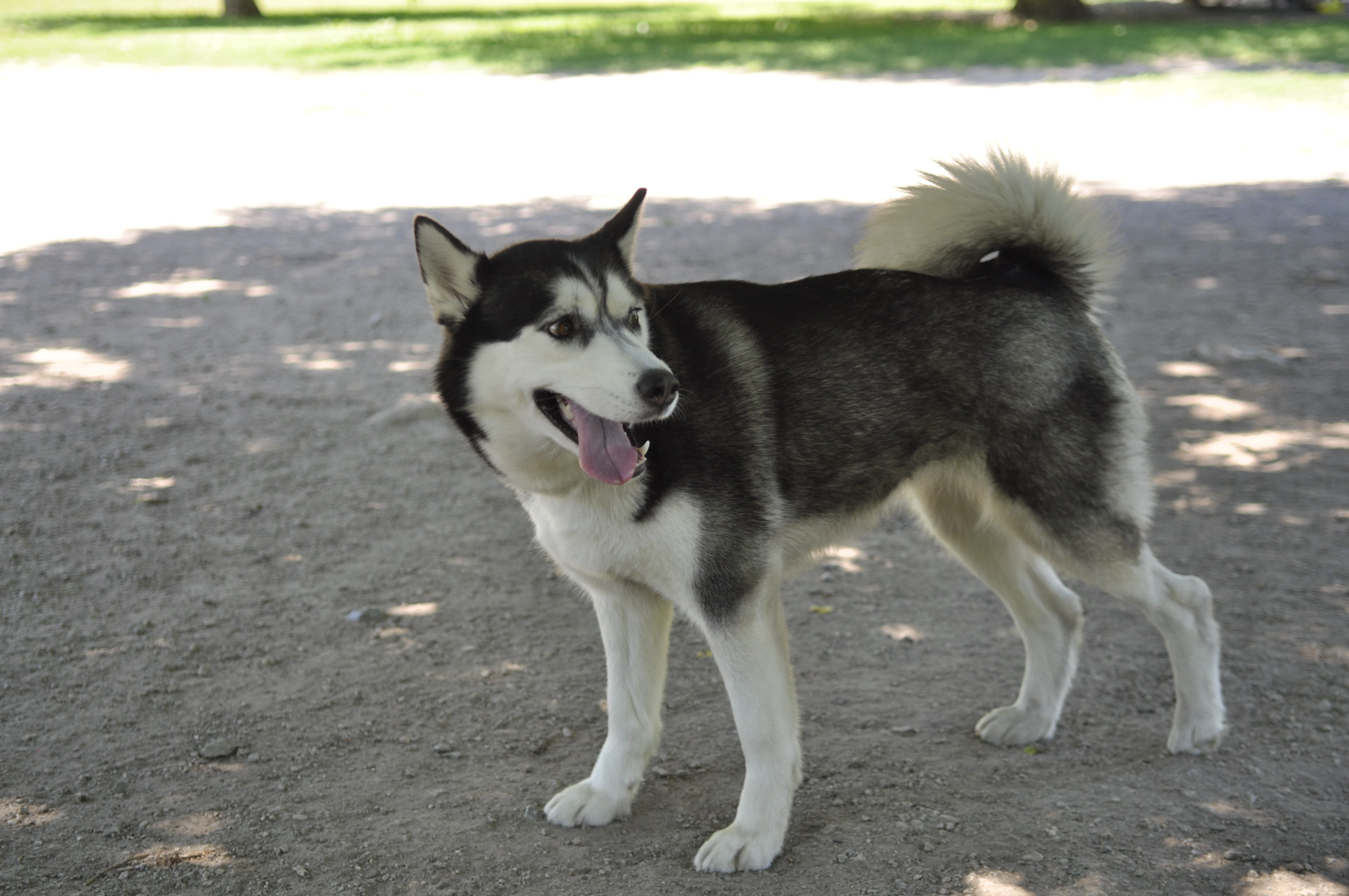
I for one, experience both sides on this problem! I'm a student who sometimes struggled with feeling this lack of community and I'm also a dog owner who would love if both me and my dog could meet more people (see my dog to the right <3)
When we talk to people who have really strong dog community connections, we often find it's through a social media app or a spontaneous interaction.
When we talk to people who have really strong dog community connections, we often find it's through a social media app or a spontaneous interaction.
HOW MIGHT WE
Create an engaging and accessible campus animal loving community that fosters student well-being, strengthens social connections, and enhances a sense of belonging?
Defining Success
👯♀️ Facilitate Meaningful Connections
Users should be able to easily find and interact with dog owners and meetups in a way that feels natural, comfortable, and engaging.
🔑 Introduce Key Features
Users need a clear, engaging introduction to what PetMap offers and how they can benefit from it.
⚠️ Prioritize Safety
Ensure users feel secure when meeting up with others, minimizing risks associated with meeting strangers.
💪 Build Confidence in Users
Make users feel comfortable engaging with others, even if they don’t own a dog themselves.
DISCOVER
What are users saying?
When I joined PetMap, a significant portion of the preliminary user research had already been completed, primarily through user interviews.
To complement this data, I conducted competitive research to analyze how similar platforms (dog-walking apps, pet social networks, and community meetup platforms) approached user engagement, trust, and safety.
This helped me identify opportunities to refine our onboarding experience and meetup discovery flow.
To complement this data, I conducted competitive research to analyze how similar platforms (dog-walking apps, pet social networks, and community meetup platforms) approached user engagement, trust, and safety.
This helped me identify opportunities to refine our onboarding experience and meetup discovery flow.

Key Findings
1. Strong Interest from Students, but Hesitations from Dog Owners
Many students have a clear desire to pet dogs and meet dog owners, but dog owners have concerns about safety, liability, and privacy.
Many students have a clear desire to pet dogs and meet dog owners, but dog owners have concerns about safety, liability, and privacy.
2. Dog Behaviour & Safety
Dogs may not get along with everyone. Some dogs may be reactive or aggressive.
Feeding treats can be harmful or go against dietary restrictions.
Dogs may not get along with everyone. Some dogs may be reactive or aggressive.
Feeding treats can be harmful or go against dietary restrictions.
3. Privacy & Location Tracking
Owners may be uncomfortable with real-time tracking.
Some users would rather not share personal details.
Owners may be uncomfortable with real-time tracking.
Some users would rather not share personal details.
DEFINE
User Stories & Infomation Architecture
At this stage of the project, the founders already had a semi solid idea of what they wanted PetMap to be.
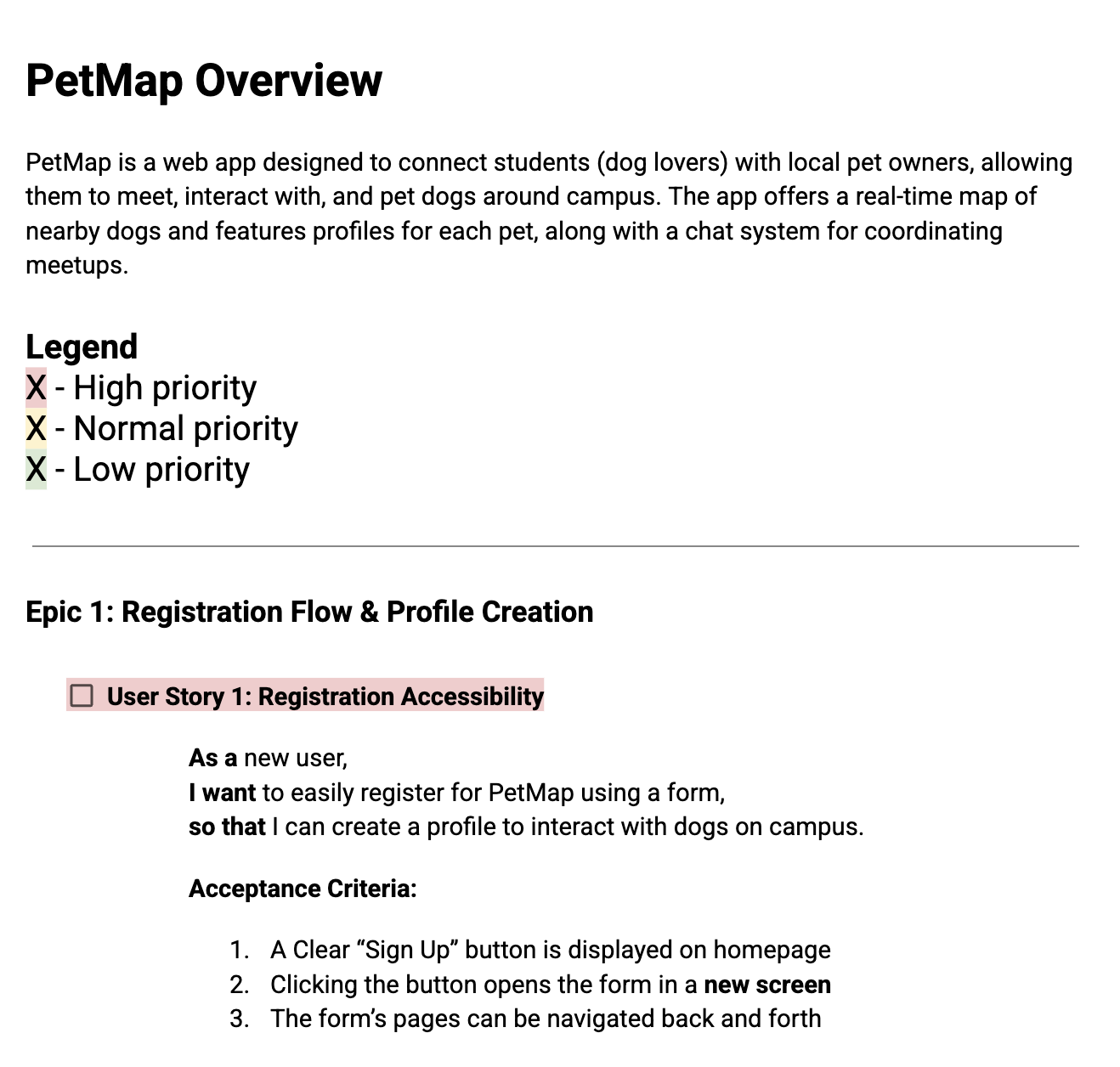
To define features, I collaborated with the Founders, Development Lead, and PM to create user stories that outlined key interactions and pain points.
This helped us understand how each feature addressed an actual user need that was directly correlated with a certain user pain point. Labelling prioritization also really helped with feature prioritizations mapping for MVP.
Working with this cross functional team also helped ensure alignment between design and development!
To define features, I collaborated with the Founders, Development Lead, and PM to create user stories that outlined key interactions and pain points.
This helped us understand how each feature addressed an actual user need that was directly correlated with a certain user pain point. Labelling prioritization also really helped with feature prioritizations mapping for MVP.
Working with this cross functional team also helped ensure alignment between design and development!
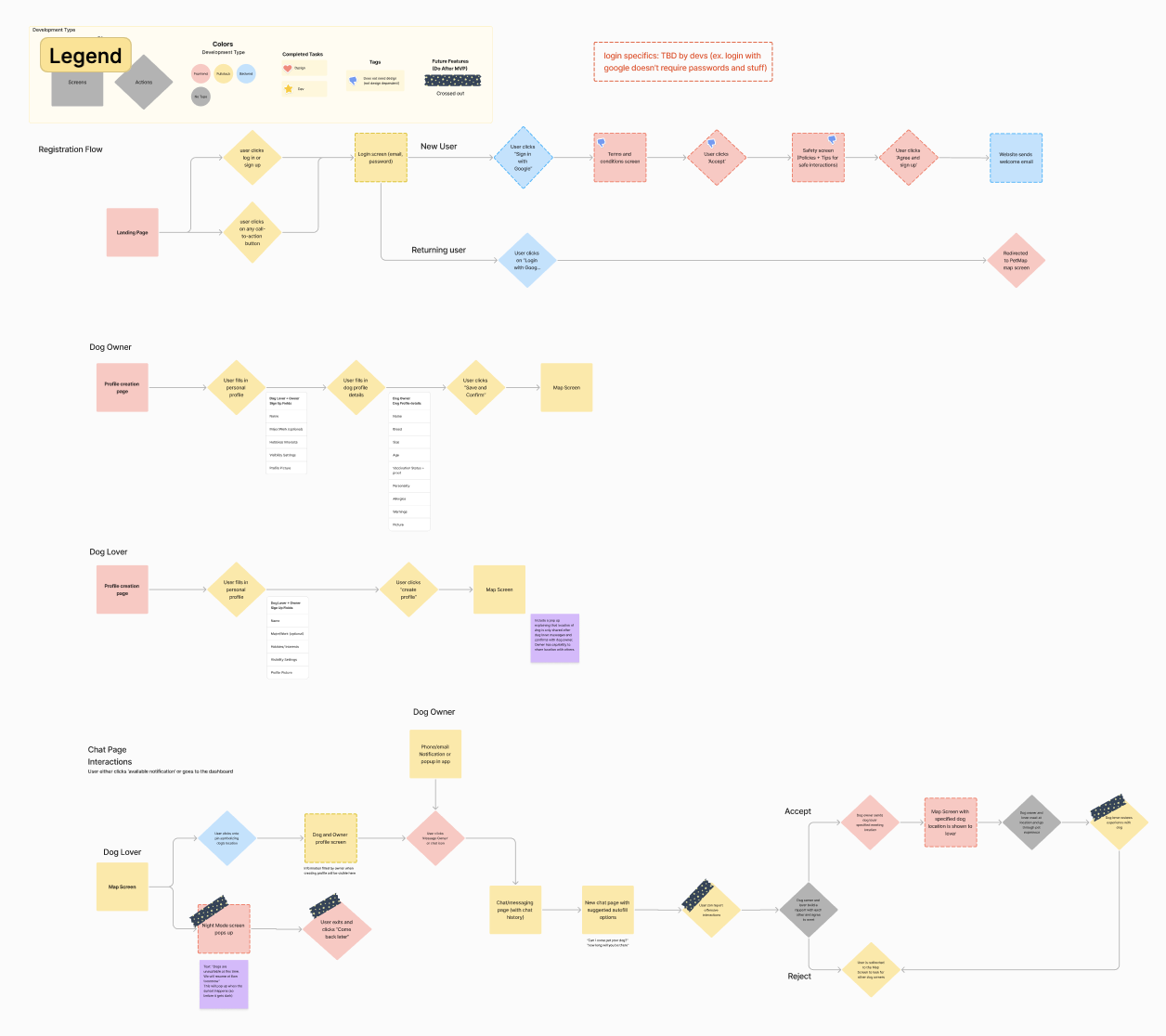
I worked with the founders and development lead to iterate on the pre-existing user flows to better map out the information architecture of PetMap. This helped reinforce the navigation flow and refinined key touchpoints to enhance usability.
My main focus areas were the registration flow, the map flow, and the chat function.
My main focus areas were the registration flow, the map flow, and the chat function.
DEVELOP
I lead weekly design work sessions with the product designers, where we ran design sprints to iterated on each of the primary features.
Due to time contraints, we jumped straight into high-fidelity mockups in Figma. Without these lofi wireframes, we really tried to ensure functionality by doing weekly design critiques and testing with our team.
Due to time contraints, we jumped straight into high-fidelity mockups in Figma. Without these lofi wireframes, we really tried to ensure functionality by doing weekly design critiques and testing with our team.
Technical Constraints
One of the key constraints I had to work with was the need for a fast launch. While a native mobile experience would be ideal for this product, developing a web app allowed the team to ship quickly and test with a broader audience, aligning with the founders’ goals. This was a usability trade-off I had to accept, but I created the design system with scalability in mind, ensuring it can seamlessly adapt to mobile in future iterations.
DESIGN SOLUTIONS: ONBOARDING
01 Feature
Simple Onboarding
From the landing page, users can go through a quick process to sign-up with PetMap.
Onboarding
When designing PetMap’s onboarding, I focused on two key UX principles:
A. Progressive Disclosure
Reducing cognitive overload by introducing features gradually
B. Personalized Profiles
Helping users feel more connected and encouraging meaningful interactions. Personalized profiles made it easier for users to find compatible meetups.
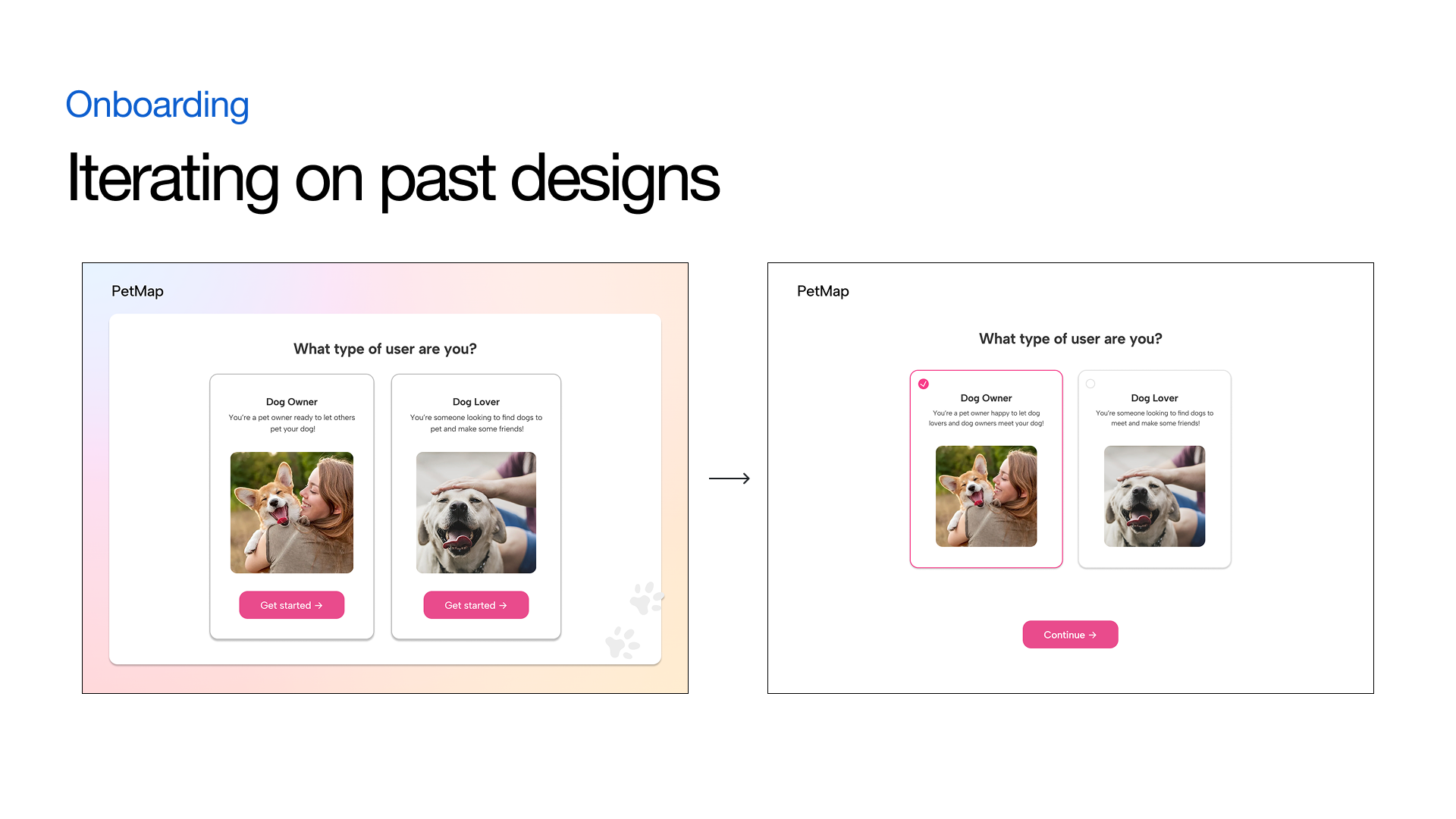
I reworked a few pre-existing screens for usability and clarity, and to better fit within the new design system.
Addressing User Safety ⚠️
How might we ensure the safety of both users and their dogs?
Based on user insights gathered from our primary research, I determined it would be best to incorporate 3 solutions into user onboarding: Contextual Warnings, Vaccination Status Indicators, and Safety-First Onboarding.
Warnings & Vaccinations
Warnings let users know critical information about the dog before meetups occur. These warnings help set clear expectations and minimize the risk of negative interactions.
By providing dog owners with an option to display their pet’s vaccination details, we aimed to builds trust between users and promotes responsible pet interactions by reducing potential health risks.
Safety Tips
Safety tips covers responsible interactions, dog behaviour awareness, and best practices for first-time meetups before the user gets access to the map view to ensure users are well-informed from the outset.
These features helped address owner concerns about health, liability, and overall meetup safety.
DESIGN SOLUTIONS: MAP VIEW
02 Feature
Map View
The map view allows users to easily view nearby dogs. Pop up map icons provide users with a description about the dog and dog owner.
We made sure to include a "Visibility" button, which allows users to easily enable or disable their location.
We made sure to include a "Visibility" button, which allows users to easily enable or disable their location.
ITERATIONS
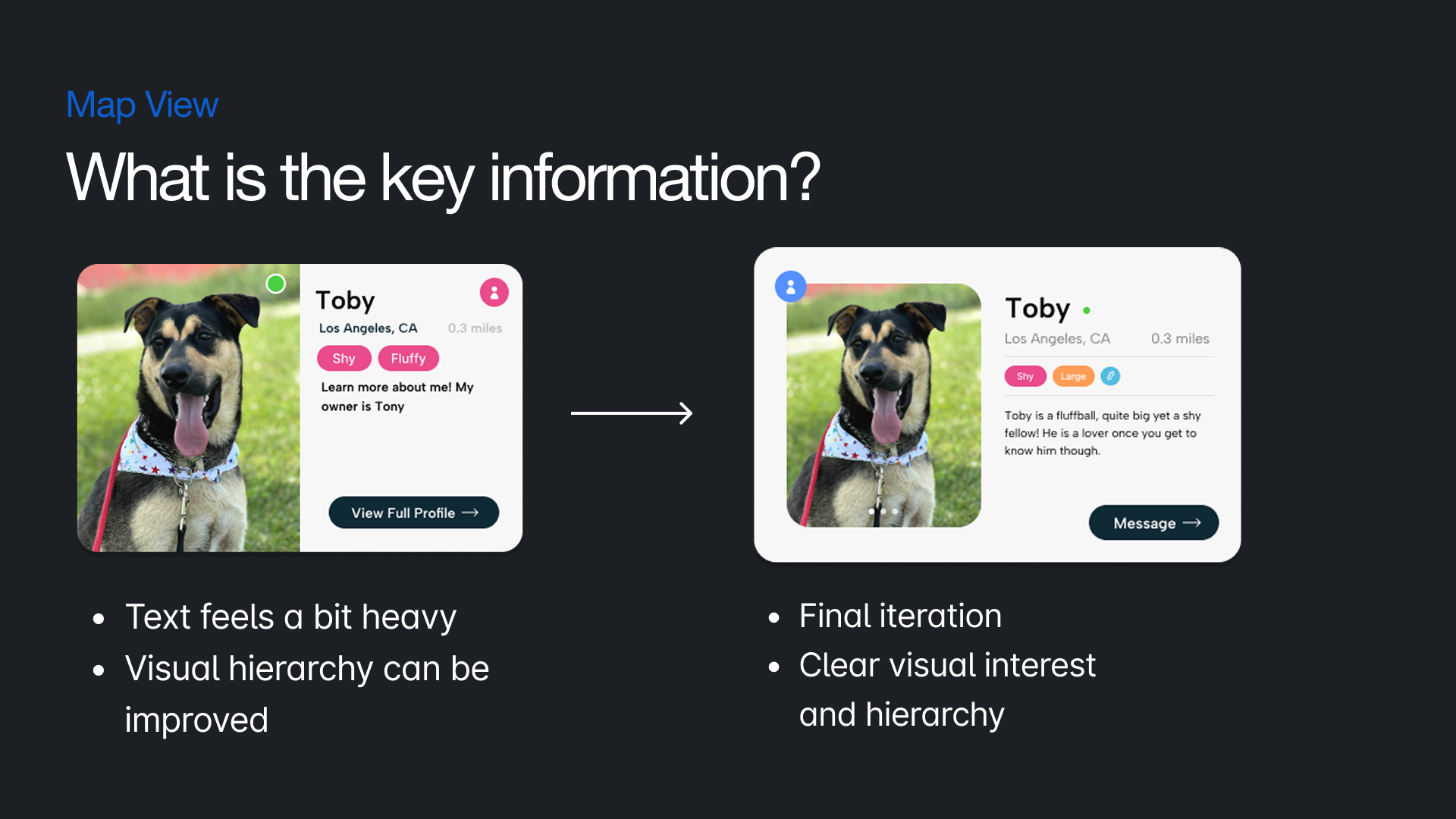
The sidebar cards went through a lot of iterations, initially we were unsure on what the key information we needed to include. In our final version, we leaned into the idea of an ID card. We thought it was an eye catching and effective way to display key user and dog information.
See below our first and final design iteration.
See below our first and final design iteration.
What about the Owners?
We wanted users to be able to view owners information of the map page as well, after all you're meeting up with both dog and dog owners!
To display owner information we explored 3 different ideas.
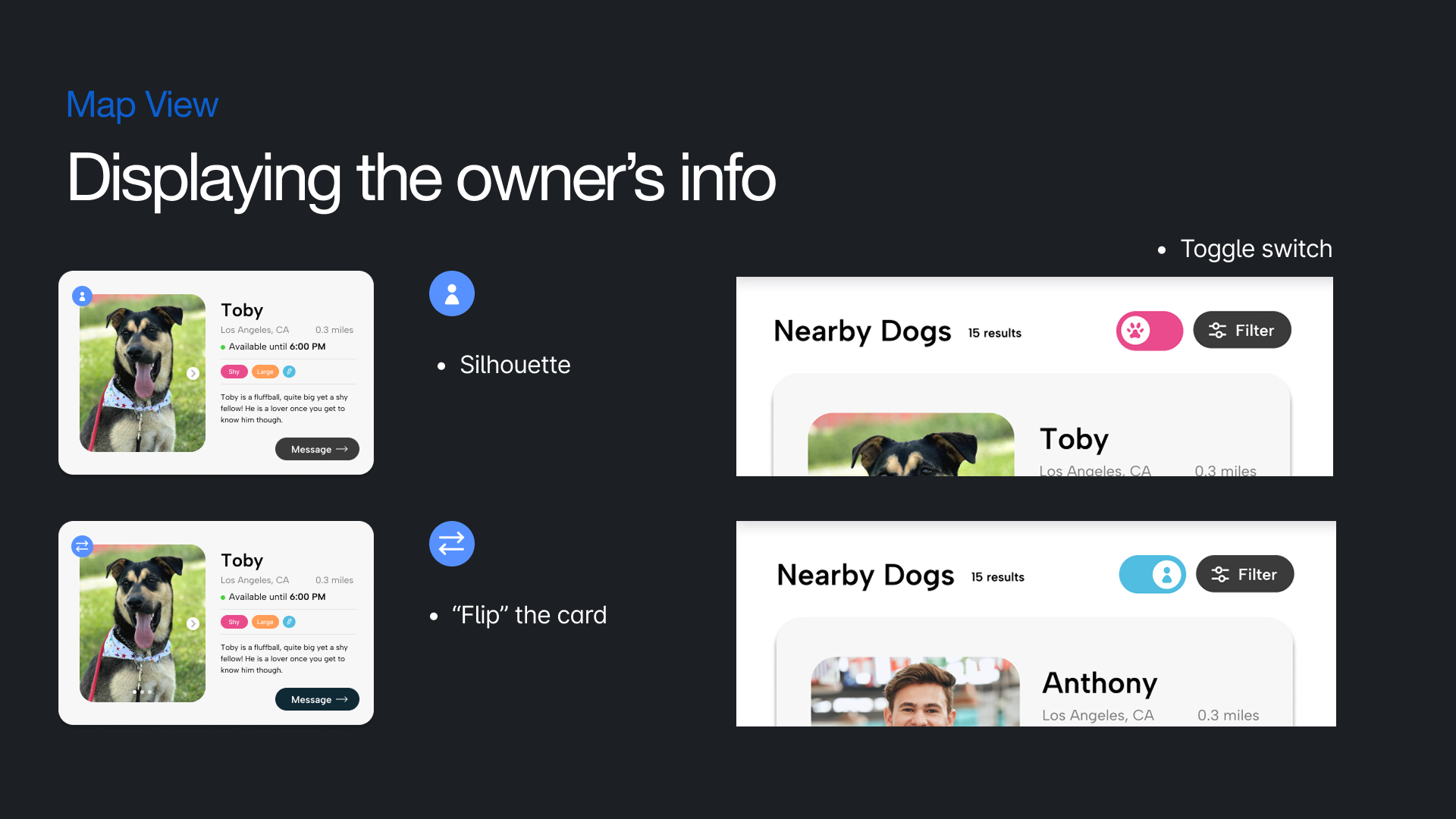
1. The "Flip"
The idea of the flip icon was to represent "flipping" the dog card to see the owner profile card on the other side. However, after testing, many users indicated that they initially didn't really understand what the button was supposed to represent.
2. The Silhouette
The design is similar to the flip button, but features a human silhouette. Users found this representation intuitive and easily associated it with viewing the owner's profile.
3. The Toggle Switch
The final exploration was a toggle switch at the top of the side bar. Once triggered, the toggle would change all dog profiles to their respective owners. User testing revealed that participants typically browse dog profiles individually, first viewing a dog's profile and then checking its owner's profile before moving on to the next dog. Given this behaviour, displaying all owner profiles at once didn’t align with how users naturally navigate the app.
Based on user feedback, the silhouette button proved to be the most effective solution.
The idea of the flip icon was to represent "flipping" the dog card to see the owner profile card on the other side. However, after testing, many users indicated that they initially didn't really understand what the button was supposed to represent.
2. The Silhouette
The design is similar to the flip button, but features a human silhouette. Users found this representation intuitive and easily associated it with viewing the owner's profile.
3. The Toggle Switch
The final exploration was a toggle switch at the top of the side bar. Once triggered, the toggle would change all dog profiles to their respective owners. User testing revealed that participants typically browse dog profiles individually, first viewing a dog's profile and then checking its owner's profile before moving on to the next dog. Given this behaviour, displaying all owner profiles at once didn’t align with how users naturally navigate the app.
Based on user feedback, the silhouette button proved to be the most effective solution.
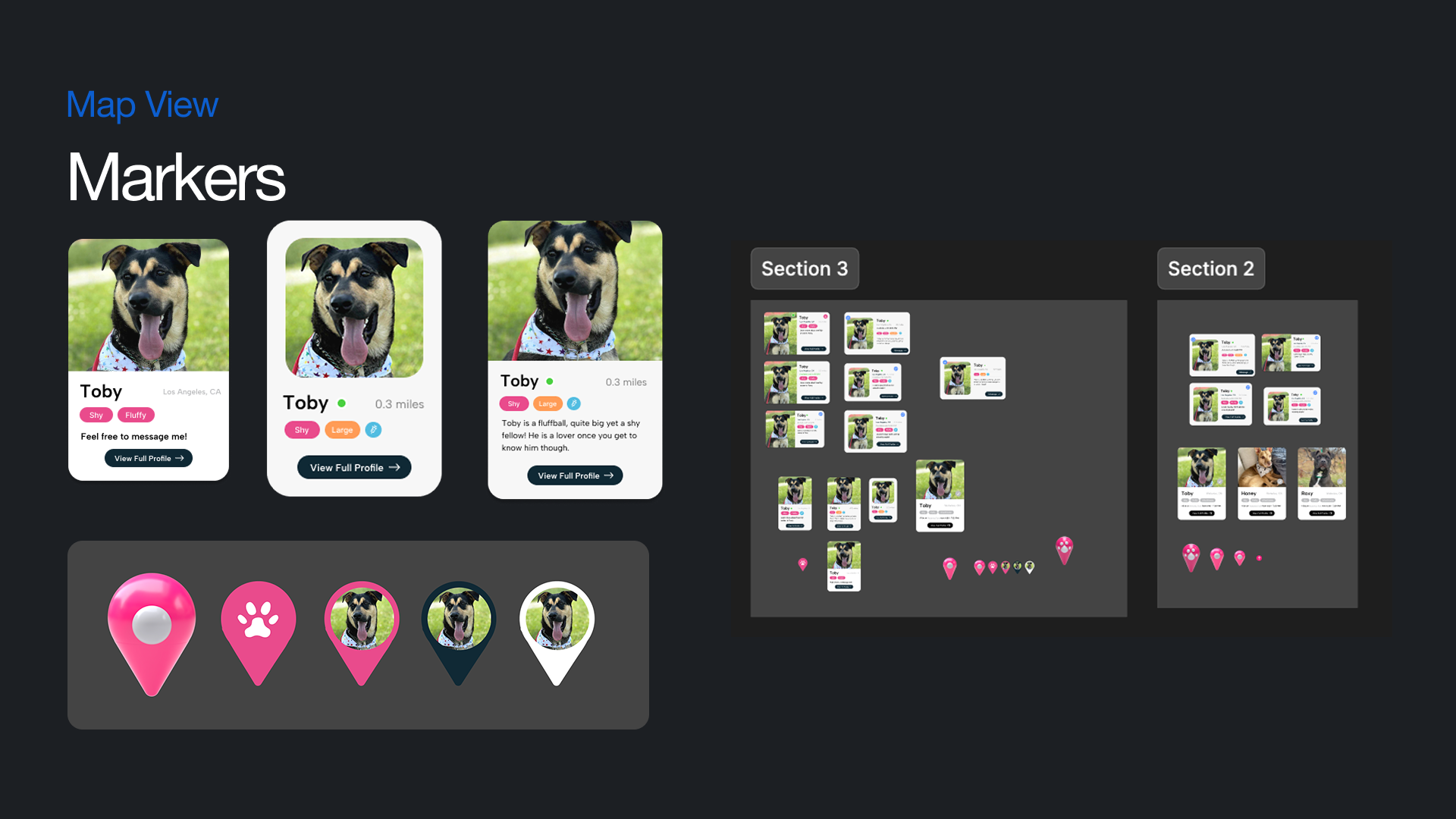
Additional Map Marker Exploration
DESIGN SOLUTIONS: CHAT FUNCTION
03 Feature
Designing for Connection
The Chat interface is where the primary point of contact between users begin. We ensured all profile information is available and location sharing had sufficient error reduction.
Location Sharing📍
When designing the location sharing feature, I focused on error reduction to avoid accidental activation, which could lead to privacy issues or user frustration. I implemented several safeguards to ensure that users consciously and intentionally shared their location.
The user must click on the location icon within the chat interface to begin the location sharing process.
Once the user clicks the icon, a “Share Location” button appears in the chat bar, alongside an “x” button to cancel the action if the user changes their mind.
This visual cue clearly communicates the intent of the action and gives users control over whether to proceed.
The user must click on the location icon within the chat interface to begin the location sharing process.
Once the user clicks the icon, a “Share Location” button appears in the chat bar, alongside an “x” button to cancel the action if the user changes their mind.
This visual cue clearly communicates the intent of the action and gives users control over whether to proceed.
DESIGN SYSTEM
Ensuring Scalability and Consistency
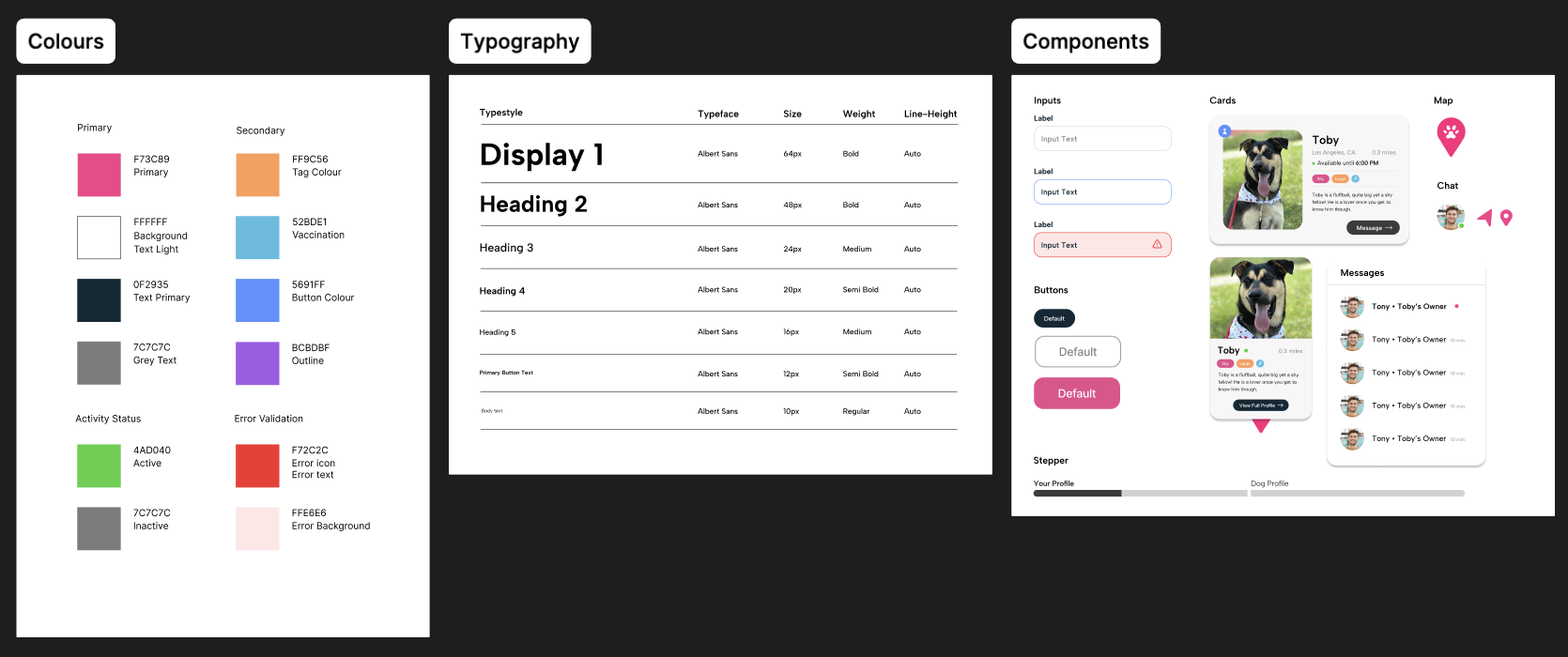
I used bright, standout colours to emphasize the playful and fun nature of PetMap. These colours were inspired by dog toys as they're meant to be very eye catching.
I also designed the components and styles with scalability and flexibility in mind. By following a modular component approach, I ensured that elements could seamlessly adapt to future features without requiring significant redesign. This makes the design system organized and scalable, allowing for efficient iteration and growth as PetMap evolves.
I also designed the components and styles with scalability and flexibility in mind. By following a modular component approach, I ensured that elements could seamlessly adapt to future features without requiring significant redesign. This makes the design system organized and scalable, allowing for efficient iteration and growth as PetMap evolves.
NEXT STEPS
This project is currently being tested with students and dog owners on the UCSD campus! Usability testing allows us to gather real-world user insights and refine the experience based on these interactions. We're aiming to ensure that PetMap is intuitive, accessible, and efficient for both students and dog owners.
REFLECTIONS & TAKEAWAYS
The Importance of Alignment Between Business and Design
As the project progressed, user feedback and evolving business goals led to significant changes in direction of the initial product. This reinforced the need for continuous communication with stakeholders to ensure the design is flexible enough to adapt to business needs while still focusing on the user experience.
Accepting Ambuguity in the Design Process
Starting out in design, we're often taught the design process in a linear way. In reality, the design process is much messier. This project was full of constant iteration and change, at several points, we had to go back and revise our initial product requirements. Introducing new features midway through the design process was admittedly frustrating and disheartening at times.
However, after completing this project, I gained firsthand experience in the importance of variability in the design process. This flexibility was ultimately essential in improving the usability, accessibility, and overall user experience of PetMap, ensuring that the product truly aligned with user needs.
However, after completing this project, I gained firsthand experience in the importance of variability in the design process. This flexibility was ultimately essential in improving the usability, accessibility, and overall user experience of PetMap, ensuring that the product truly aligned with user needs.