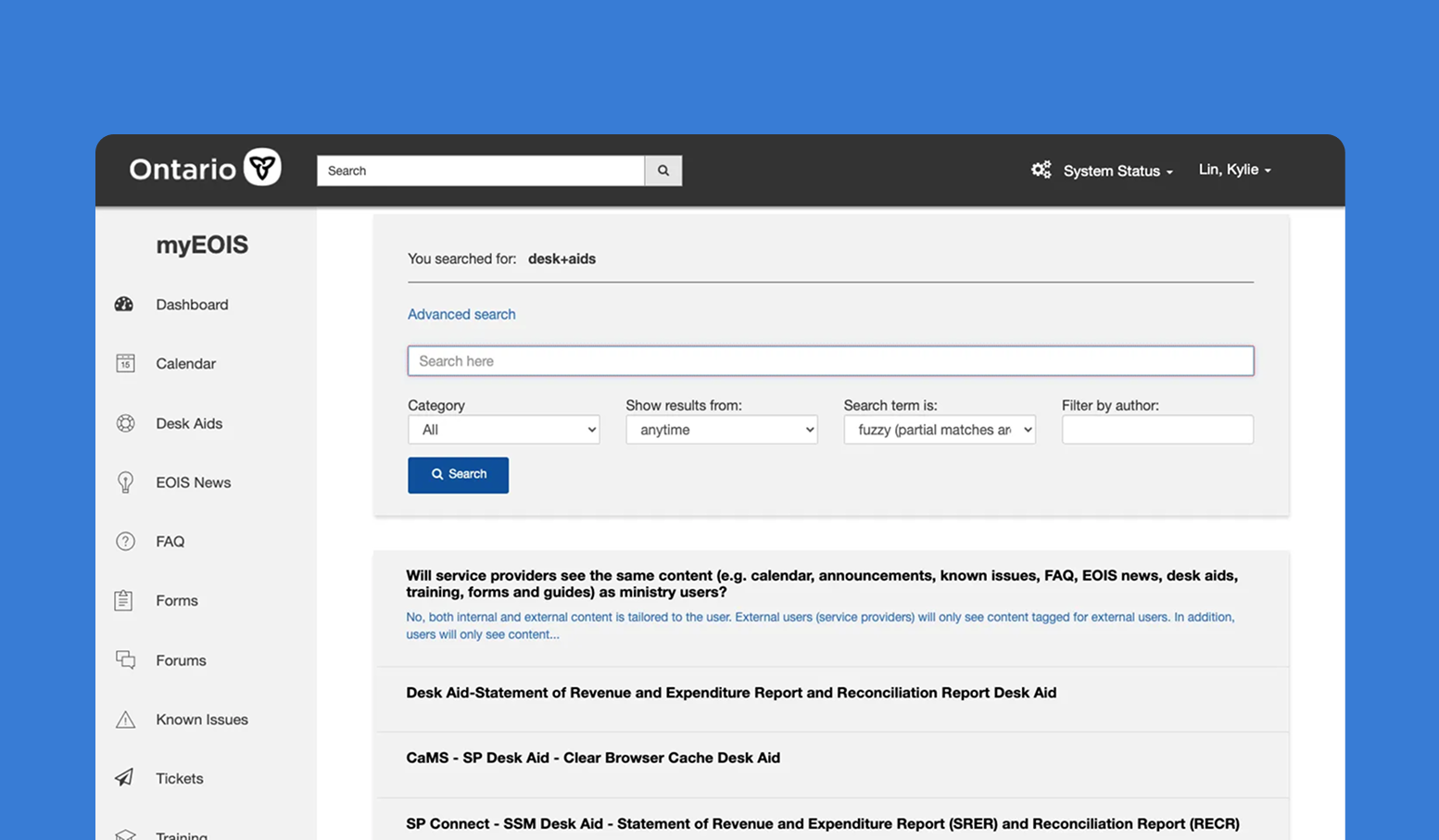
Improving the Search Functionality 🔍 of a Digital System
Jan 2024
TEAM
1 team lead, 1 tech lead, 1 QA lead, 1 product manager, 3 UX designers, 2 developers
TOOLS
Miro
ROLE
User Research, Usability Testing, User Interviews, Research Synthesis
OVERVIEW
MyEOIS
The platform myEOIS, available to both internal and external users, houses all system documentation related to Employment Ontario Information Systems (EOIS) such as desk aids, tickets, forms, and known issues.
ROLE
UX Designer
I was a UX designer at the Ministry of Labour, Immigration, Training, and Skills Development of Ontario in the Digital Business Unit, a government ministry that contributes to maintaining the province's labour market by delivering integrated employment and training programs and services. My job was to lead the user research of a search functionality improvement project for myEOIS alongside 2 other designers.
PROBLEM
Inaccurate Search Results
Users are facing problems with inaccurate search results produced by the search function within myEOIS. When navigating for existing information and resources about systems, users to spend too much time searching for relevant results, leading to users becoming discouraged and giving up to use alternatives.
We have observed that the myEOIS search function is not meeting user needs, which is causing frustration, negative user feedback, and low uptake on the search function.
We have observed that the myEOIS search function is not meeting user needs, which is causing frustration, negative user feedback, and low uptake on the search function.
HOW MIGHT WE
How might we improve the search functionality experience to support accurate results and intuitive features so there is an increase in user satisfaction ?
DEFINE
Empathizing with Users
Over the span of 3 weeks, I gathered a variety of internal and external users based on their role and familiarity with the platform.
In total, I conducted eleven 30 minute user interviews, and note-took for another five which my coworker moderated
(6 internal users, 5 external users).
In total, I conducted eleven 30 minute user interviews, and note-took for another five which my coworker moderated
(6 internal users, 5 external users).
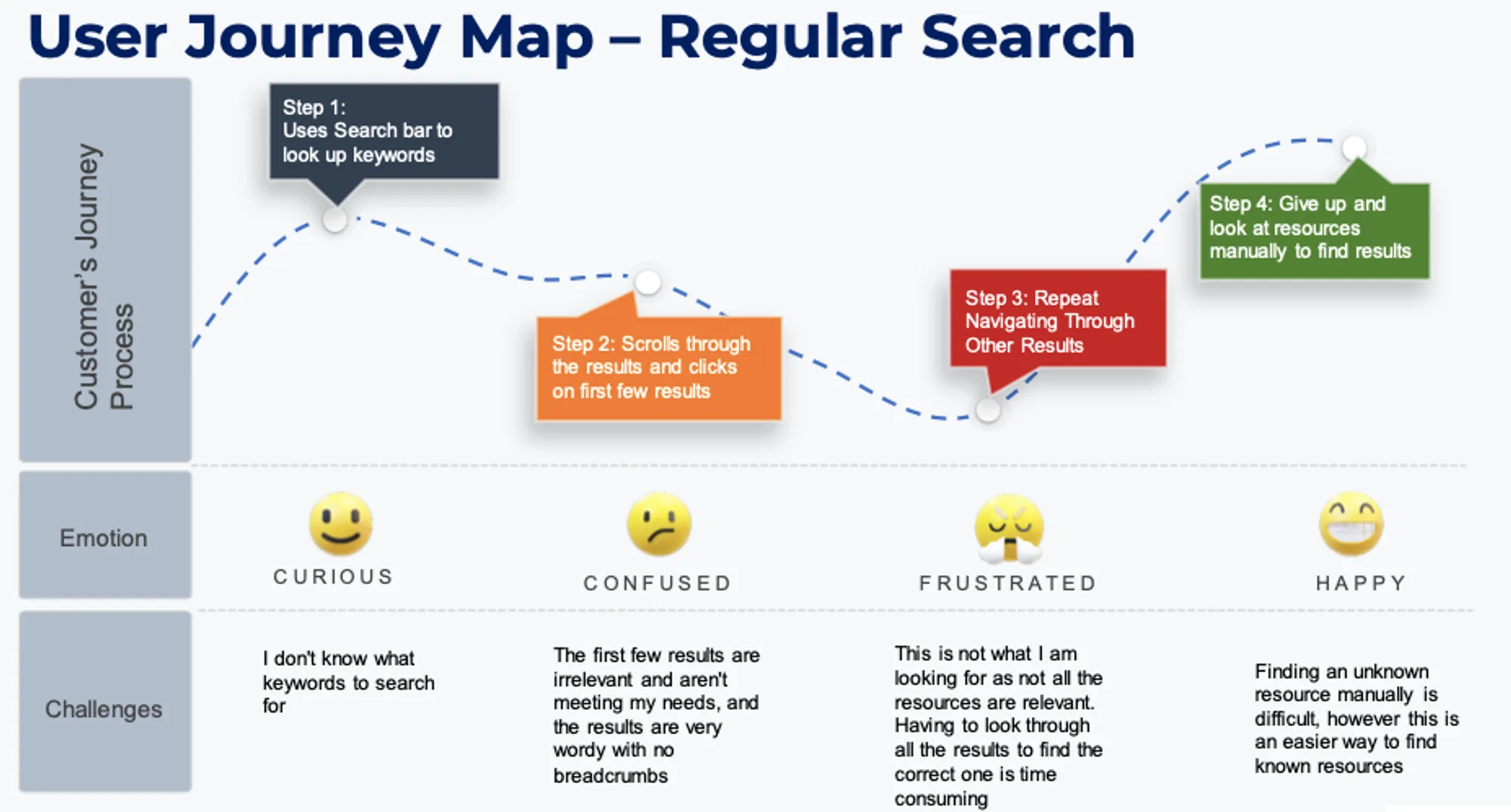
I created a User Journey Map based on one of the contextual inquiries to better empathizing with the users pain points during the search experience.
INTERVIEWS
Using the information gathered from the user interviews,I identified 3 main themes to bridge their shared pain points and guide our insights:
Irrelevant results
Inaccurate search result information
Inaccurate search result information
Not Intuitive
Unintuitive interaction and inaccessible features
Unintuitive interaction and inaccessible features
Disorganized Information
Outdated information as top results. Unable to search within section
Outdated information as top results. Unable to search within section
…as well as user suggestions for improvement.
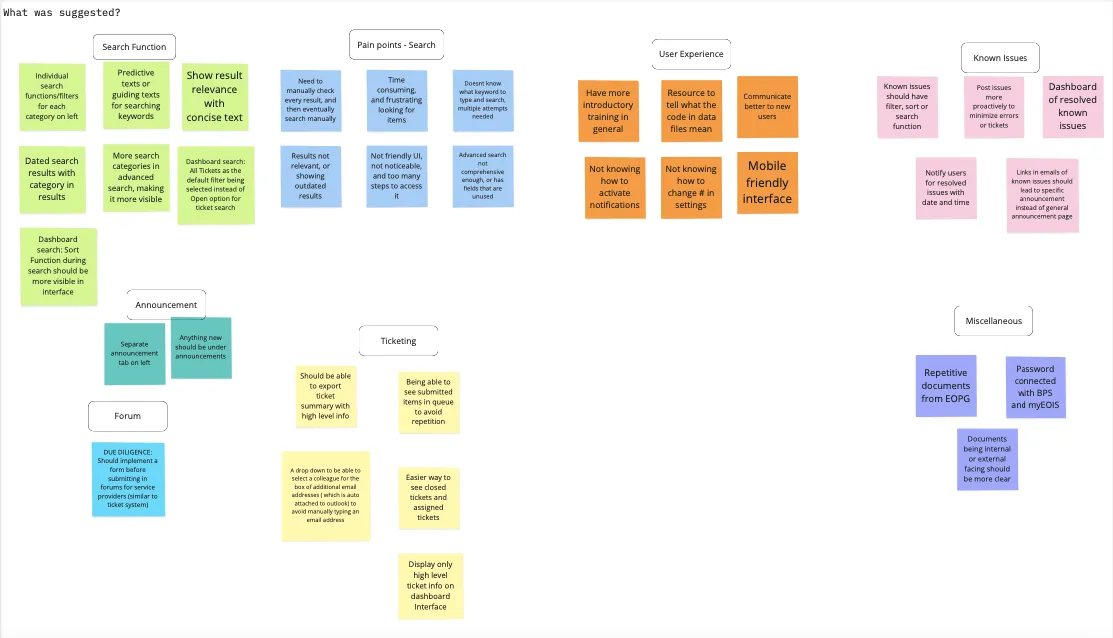
Ultimately, we identified 6 main suggestions for improvement.
Themes from User Insights
Relevant Results
Search needs to accurately scan content and quickly link related issues, providing direct resource links for user efficiency
Better User Experience
Enhance guidance for new users with bullet points, helpful tips, and clear no-results messages, aimed at external users' needs.
Dated and categorized results
Clarify search functionality and guide users on keyword use, ensuring they understand what to search and how results are organized.
Predictive text
Incorporate categorized and timestamped results to streamline finding information, using predictive text for efficiency
Section-wise search
Facilitate navigation with intuitive search features within individual sections to enhance user experience.
Backend Search
Enable All Tickets as the default filter when searching and have a more visible sort function in the ticketing dashboard
SYNTHESIS
So what?
Using the feedback and pain points gathered from the users, we created a map of prioritization to determine the importance and effort required to implement the given improvements.
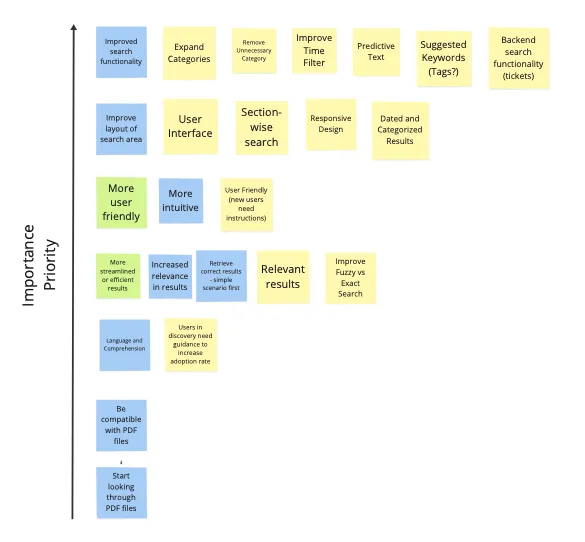
We decided on the following recommendations as priority in preparation for Alpha:
⏳ Categorization and Time-stamping of Search Results
It is essential that search results are intentionally categorized (e.g., user guides, known issues, etc.) and timestamped. This organizational strategy will significantly enhance the user's ability to swiftly locate relevant information and understand the currency of the content provided.
🖊️ Enhanced Data Table Design
There is a need for the implementation of a new data table that employs an intelligently designed header and body copy. This design improvement is aimed at augmenting comprehension, thereby enabling users to quickly grasp the essence of the content presented in the search results.
🗺️ Direct Navigation to Content
The search functionality must be optimized to ensure that the results directly facilitate navigation to the respective content pieces. This direct linkage is essential for providing a seamless user journey, minimizing the number of steps required to access desired information.
📊 Analytics and Monitoring
Integrating analytics to monitor search patterns, frequently searched terms, and user interactions with search results can provide data-driven insights to further enhance the search functionality
The solution does not have to address every single problem and pain point. Rather than creating a one-size fits all, it should focus on a few key tasks and maximize efficiency and intuitiveness.
REFLECTIONS & TAKEAWAYS
Face the unknown head on
I remember nervously waiting in the MS Teams waiting room to conduct my first user interview. As the interview went on, my nerves subsided and I quickly realized this was a great learning experience to develop my skills and learn about users. With this new determination and support from my team lead, I was empowered to advocate for and make informed design decisions.
Talk to users directly
Oftentimes, I found it was easy to get stuck in my own assumptions about a problem space, these assumptions hindered me from truly understanding and identifying what the user is looking for and our knowledge gaps. Once I spoke to users directly and took in their feedback, I realized users will see things or feel things you cannot. The user feedback we collected ensures that our future prototype meets real-world expectations and needs.